

Cybercriminals have come a long way from mass emails filled with typos and obvious red flags. Today’s phishing attacks are highly targeted, convincingly written, and increasingly difficult to detect.
With the rise of AI, scammers can now mimic legitimate businesses, coworkers, and even people you know. And these attacks don’t just live in your inbox anymore—they show up in text messages, social media, phone calls, and more.
Knowing how to spot a phishing attempt is no longer optional—it’s essential.
What Is Spam (and How Is It Different from Phishing?)
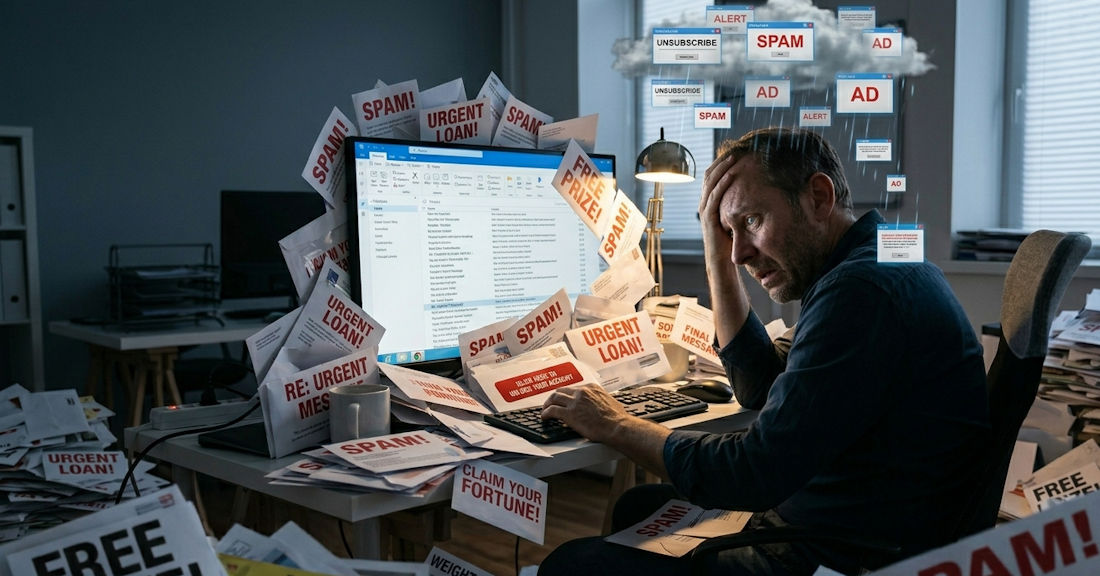
Spam is a general label applied to any communication that’s unsolicited, malicious, deceptive or plain fraud. The term is also used to refer to mass-communications like advertising.
The majority of spam noisy and annoying. Venturing into your email’s junk folder or trash folder, it’s likely full of spam. But rarely is spam actually dangerous.
When spam is dangerous, it’s usually a phishing attempt.
What Is Phishing and How Does It Work?
Phishing is a tactic used by cybercriminals to steal information. In a successful phishing attempt, these criminals are able to use that stolen information to a number of things, from impersonation and identity theft to blackmail, malware and reputation damage, to direct financial fraud.
At the end of the day, the goal of most cybercriminals is to steal money. But it begins with a carefully crafted phishing campaign to extract vital information and get a foot in the door.
Over the past few years, the Canadian Anti-Fraud Centre has received nearly 24,000 phishing reports. But of course the real numbers are much higher. Phishing is a daily threat, and it’s more important than ever to know how to protect yourself and your loved ones.
How Phishing Attacks Work?
The primary goal of a phishing attempt is to extract information, which ultimately enables a cybercriminal to inflict damage or steal money.
Historically, email was the typically channel for these cybercriminals. But now they operate in numerous digital avenues including text messages, social media, dating apps, phone calls and QR codes.
There are several tactics these phishers will use to commit fraud:
- Fake Websites
Cybercriminals commonly setup fake websites that look legitimate in order to coerce people to login or enter their personal data. In some cases, these websites will look pretty real. These dupe sites used to be easier to spot, but now they phishers have the ability to create picture-perfect copies.
- Clone Phishing
Clone phishing involves mimicking email addresses, URLs or files in order to trick people into opening them or clicking on them. Also referred to as “domain spoofing” and “email spoofing”, this information is designed to look nearly identical to the company being impersonated.
- Using Personal Data Against You
These days, your personal info isn’t as private as it once was. Cybercriminals are able to purchase personal information or use a computer program to extract data from another website, app or database. All this means your personal data is not hard for criminals to find. Phishers will use personal information to convince uses that their schemes are legitimate.
- AI-Generated Phishing Attacks
AI is used by cybercriminals to create well-written and realistic sounding communications. Gone are the days of being able to easily spot these cybercriminals due to spelling errors and strange grammar. AI has made phishing emails significantly harder to detect.
- Threats
Phishing attempts are able to get the attention of users so often because they threaten to charge users or deactivate accounts due to some unpaid balance, inactivity, or other made-up reason.
- Fake Shipping Notifications
With so many of us ordering things online these days, cybercriminals have used that to their advantage. One of the more common phishing attempts via SMS text is a shipping update that requires some kind of action, like clicking a link or confirming a delivery.
- Stealing 2FA Codes
If a user’s personal login information has been acquired one way or another, scammers will attempt to login to that account, triggering a two-factor authentication (2FA) code sent via text or email. These cybercriminals will use threatening, deceptive or impersonation tactics to coerce users into relaying that code, allowing them access to accounts.
- Voice Phishing
One of the more advanced methods of phishing over the phone is voice phishing, or “vishing”. Scammers will trick people into revealing personal information by using AI voice cloning to impersonate someone’s voice.
How to Spot a Phishing Attempt?
In order to keep you and your loved ones safe in today’s digital world that’s ever-changing, here are a number of things to watch for on the lookout for phishing attempts:
1. Suspicious Email Addresses
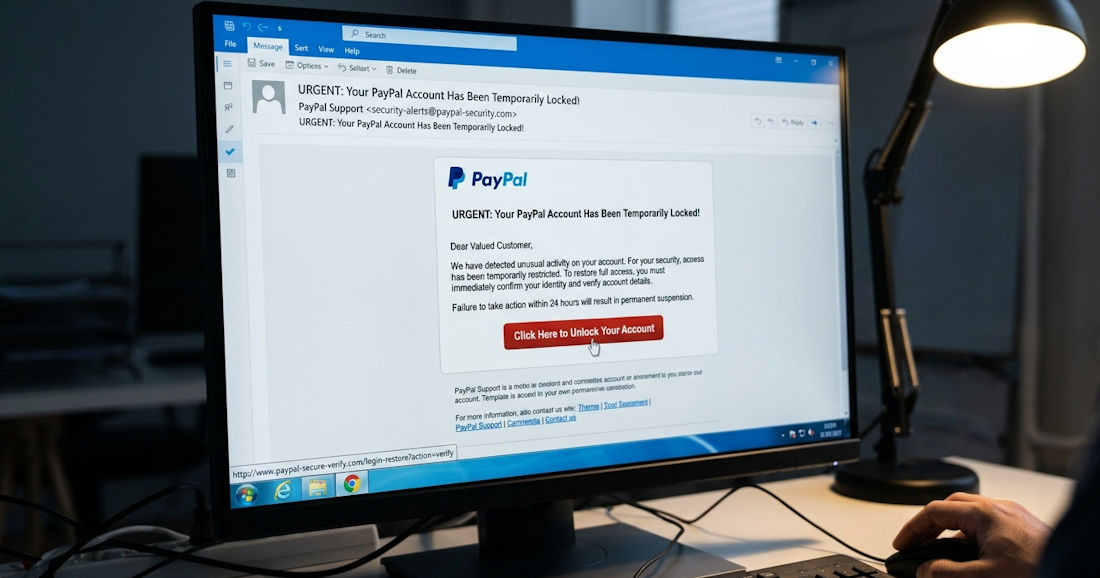
The sending email address of a legitimate organization will almost always include the company name in their email domain. For example, name@caorda.com. If random symbols, numbers or additional letters are added to that domain, that’s a sure sign of a phishing attempt. For example, name@caorda12.com. Cybercriminals might also add the company domain into the email prefix, while using an unrelated email domain in hopes of confusing receivers, like this recent Caorda impersonator tried: hello.caordawebsolutions@gmail.com
However, a safe-looking from email address isn’t fool-proof. In more rare instances, hackers will have obtained access to an email domain and will be able to send phishing attempts from legitimate email addresses.
2. Suspicious Links & URLs
Along with legitimate email addresses, always be on the lookout for legitimate URLs. URLs are linked to text in a communications, and will open when you click on them. The biggest point of deception here is a URL that does not match the URL that appears in the communication. To check the actual URL being linked, hover over the link with the mouse to discover where the link is trying to send you. If the URL doesn’t seem correct or something feels fishy, don’t click it.
Another warning sign to watch for is the http protocol. If the URL begins with “http” rather than “https”, that’s an insecure link and likely an illegitimate one.
3. Requests for Personal Information
If you receive a communication via email, text, phone or elsewhere that directly requests personal information, this is likely a phishing attempt. The majority of legitimate companies will never ask you for login information, payment information or other personal data – especially via email. If the sending is an institution like a bank or government, you can be sure they already have your information, meaning there’s no need for them to be asking.
If you’re ever suspicious about someone asking for your information, the safest route is to call the number on that company’s website.
4. Unsolicited Attachments
It isn’t unheard of it, but it’s a little unusual for legitimate companies to send emails with unsolicited attachments. More often, they’ll direct you to download files directly from their app or website. If you’re unsure about a sender, do not click on any attachments.
Also note that certain attachment file types are more suspicious than others. Filenames that end in “.exe”, “.scr” or “.zip” are typically higher risk.
5. Threatening Language & Urgency
A tell-tale sign of a phishing attempt is the language being used by the sender or caller. If you’re being made to feel a sense of urgency, or your being threatened or fed demands, that’s a phishing attempt.
Legitimate organizations will not use these coercion tactics. Instead, you’ll notice they’re cordial and polite, calling you by your first name early and often.
6. External or Unknown Senders
An email host or IT department can set up certain security measures that label suspicious emails. These warnings can be setup a number of ways, labelling first time senders, external senders or likely-spam senders.
If your business hosts your email with a trusted Canadian email host like Caorda, we’ll use advanced spam filtering and spam firewalls to protect your inbox from phishing attempts. Plus, our support team is always standing by to answer questions about suspicious emails, and to develop solutions for email labelling and warnings.
Aside from spam-filtering and firewalls, Caorda’s support team is able to enable a grey listing feature for your inbox that prompts first-time senders to reattempt their email delivery at a later time (e.g. 5 minutes). We’ve found this strategy is able to significantly reduce the volume of spam and phishing attempts.
7. Spelling & Grammar
If an email is filled with notable misspellings and odd grammar, that’s an immediate red flag for a phishing attempt. However, this was the way of old-school phishing attempts – you’re unlikely to encounter blatant errors like these from modern cybercriminals.
8. Too-Good-to-Be-True Offers
If a communication is offering something that’s too good to be true, it probably is. Always be hyper-suspicious of unexpected grants, rebates, winnings and inheritances.
Investigating a Real Phishing Attempt
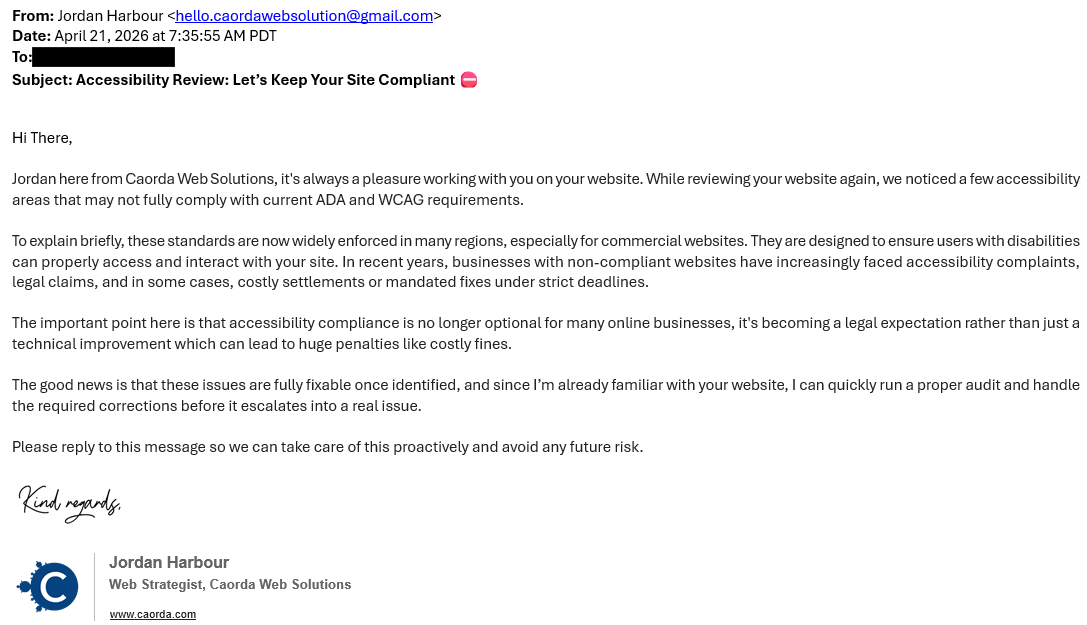
Recently, we had someone who tried to impersonate a Caorda team member in an email to some clients. That email is shared below. At first glance it looks like a legitimate email, complete with proper spelling, sensical grammar, and an email signature with our logo. There also aren’t any suspicious links, and the sender isn’t requesting information or action – only a response.
But upon a closer look, we can see that this is an impersonator. Here are a couple red flags:
- From address. This is the biggest red flag, and a sure sign of an impersonator. The sender is using a Gmail email address, indicated by the email domain: @gmail.com. The sender has included “caorda” in the email prefix in an attempt to confuse users. Remember, emails from Caorda will only end in @caorda.com.
- Impersonal greeting. The greeting is minor, and not a sure sign of impersonation, but it’s certainly a red flag. This sender used “Hi There” as a greeting, rather than using our client’s real name. This is a red flag, indicating the sender likely spammed many people with the same copy and pasted email content.
Phishing attacks are becoming more convincing, but most can still be avoided by staying alert and taking a moment to question anything unexpected. When in doubt, don’t click—verify the message through a trusted source.
For businesses, having the right protections in place is just as important as user awareness. At Caorda Web Solutions, we provide secure email hosting, advanced spam filtering, and hands-on support to help keep your inbox protected.