Caorda Logo
  • Design
    • Design
    • Website Design
    • Branding & Logo Design
    • Print Design
    • Our Design Process
  • Development
    • Development
    • WordPress Development
    • Website Development
    • Mobile Apps
    • Software Development
    • Database Development
  • Hosting
    • Hosting
    • Web Hosting
    • Email & Exchange Hosting
    • Secure File Hosting & FTP Solutions
    • Managed VPS Hosting
  • Digital Marketing
    • Digital Marketing
    • SEO Services
    • Google Ads & SEM
    • Social Media Marketing Services
    • Blog & Article Writing
    • Email Marketing Services
  • About Us
  • Blog
  • Careers
  • Our Work
  • Pay an Invoice
  • Support
  • Contact
  • +1.250.598.6772
  • COVID-19 Policy
Caorda Logo
  • Design
    • Website Design
    • Branding & Logo Design
    • Print Design
  • Development
    • Website Development
    • Mobile Apps
    • Software
    • Databases
  • Hosting
    • Web Hosting
    • Emails
    • Secure FTP
    • Managed VPS
  • Digital Marketing
    • SEO Services
    • Google Ads & SEM
    • Email Marketing
    • Social Media

FAQ

9
  • Caorda’s DNS settings
  • Fix duplicate emails in Outlook
  • The new Caorda Webmail
  • What version of Outlook am I using?
  • How to Pay an Invoice
  • How do I receive Maintenance Notifications?
  • Spam – Email Rate Limit
  • Does Caorda offer cPanel ?
  • Where is my data located?

Setup a Device

15
  • [IMAP] iPhone or iPad (IOS 16+)
  • [IMAP] iPhone or iPad (IOS 18+)
  • [IMAP] Android devices (Android 12+)
  • [IMAP] Mac Mail
  • [IMAP] Mozilla Thunderbird
  • [IMAP] Outlook Office 365 for Mac
  • [IMAP] Outlook Office 365 for Windows
  • [IMAP] Outlook for Android Devices
  • [IMAP] Outlook for iPhone or iPad
  • Setup Default Folders on iPhone or iPad (IOS 18+)
  • [POP] GMAIL
  • [POP] Mac Mail
  • [POP] Outlook Office 365 for Mac
  • [POP] Outlook Office 365 for Windows
  • [POP] Outlook 2013-2016 for Windows

Caorda Mail

9
  • Archive my emails in Outlook
  • Two-Factor Authentication for Webmail
  • Setup Auto-Response
  • Forward Email to Another Address
  • Add a Signature
  • How do I access Webmail?
  • How to change my Password
  • I can’t see all my folders in Outlook
  • Password Policies

Caorda Mail Administration

8
  • Getting Started
  • Create a User
  • Change a Users password
  • Change User Defaults
  • View and Manage user connections
  • Enable Plus-Addressing
  • Add a User Alias or Distribution Group
  • Remove a User

Spam

9
  • How do I disable Geo-Blocking?
  • How do I disable Spam-Filtering?
  • How do I manage my Quarantine?
  • How do I mark an email as Safe?
  • Can you block an entire country from sending you Email?
  • How do I block an email address or domain?
  • How do I manage my settings?
  • How do I login to my Spam firewall?
  • How are rules inherited?

Email Hosted Exchange

7
  • How do I access Webmail?
  • EXCHANGE – Setup my Mailbox on an Apple mobile device (IOS 16+)
  • EXCHANGE – Setup in Outlook 365 for Windows
  • Enable Contacts on the Outlook App on Android
  • EXCHANGE – Setup Outlook 2010-2016
  • EXCHANGE – Setup my Mailbox in Outlook on an iOS Device
  • EXCHANGE – Setup my Mailbox in Outlook on an Android Device

FTP

12
  • How do I check my disk usage?
  • Add users to a Group
  • How to create a User
  • How to create a Group with Directory Access
  • Enforce SSH Key based Authentication for a User
  • How to receive files using the File Sharing option
  • How to Send files to a client using the File Sharing option
  • Reset your own Multi-Factor Authentication as a User
  • Reset a single User’s Multi-Factor Authentication
  • Setting up Multi-Factor Authentication for a Domain Group
  • Setup Multi-Factor Authentication for a Single User
  • Setup SSH Key Authentication for a User

Website

2
  • What is Caorda’s WordPress Maintenance Plan ?
  • Why am I not getting emails from my Caorda QA site ?
  • Home
  • Caorda Support
  • Spam
  • How do I disable Geo-Blocking?
View Categories

How do I disable Geo-Blocking?

To completely disable Geo-Blocking, this guide will help you turn the feature off. Please note that this will require having access to an administrative account for your domain. For any questions or more information, please reach out to our support team.

Getting Started
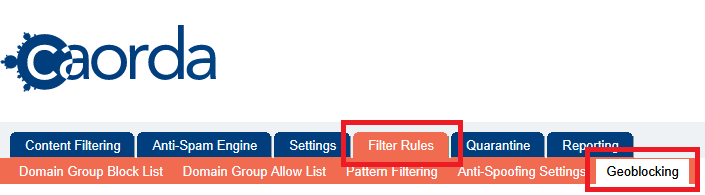
To turn off Geo-Blocking, login to the spam filter (https://mail.caorda.com) as an Administrator. After login, navigate to Filter Rules in the top Menu. Then, select Geoblocking.

Need your password? See our guide on how to access your login: How do I login to my Spam firewall?.


Toggle the filtering
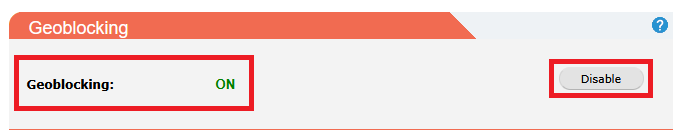
The first available section on this page is the button to Enable or Disable. Clicking this one time will toggle the rule. Click the Disable button to turn this feature Off. 


Status updated

The Geoblocking feature is now disabled. No further action is required to save, the feature is disabled when the text is updated to OFF.

Didn’t find what you were looking for?
Need more help?

You’ve got it! We’re here for you

Contact Support

Or Call: 250.598.6772

Updated on May 26, 2026
How are rules inherited?How do I disable Spam-Filtering?
Table of Contents
  • Getting Started
  • Toggle the filtering
  • Status updated
  • This field is for validation purposes and should be left unchanged.

Our Address

401–3795 Carey Rd. Victoria, BC V8Z 6T8

Say Hello

  • +1 250.598.6772
info@caorda.com
  • Get Support
  • Our Services
  • Contact Us
  • LinkedIn
  • Facebook
  • Instagram
©2026 Caorda | Privacy Policy
Client Login
  • Design
  • Development
  • Hosting
  • Marketing