
To completely disable Geo-Blocking, this guide will help you turn the feature off. Please note that this will require having access to an administrative account for your domain. For any questions or more information, please reach out to our support team.
Getting Started
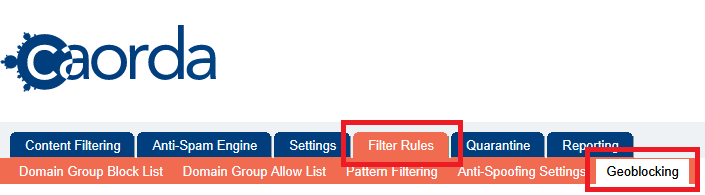
To turn off Geo-Blocking, login to the spam filter (https://mail.caorda.com) as an Administrator. After login, navigate to Filter Rules in the top Menu. Then, select Geoblocking.
Need your password? See our guide on how to access your login: How do I login to my Spam firewall?.
Toggle the filtering
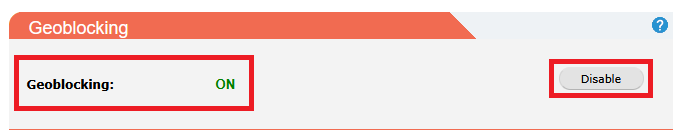
The first available section on this page is the button to Enable or Disable. Clicking this one time will toggle the rule. Click the Disable button to turn this feature Off.
Status updated

The Geoblocking feature is now disabled. No further action is required to save, the feature is disabled when the text is updated to OFF.